What are Google reviews?
A Google review is written feedback that a business can request from its customers. The feedback is recorded on your Google review page to provide feedback about the service or product your customers purchased from you. This critical feedback can have a big impact, in a positive or negative way, to your business.
How to leave a Google review for a business?
To leave a Google review for a business, you simply put their business name into the google.com search engine. If they have Google my business details turned on, simply click on the Reviews section and add your review. It is that simple. Reviews show up next to your business profile in Maps and Search. By adding a review, you will be doing the business a big favour, particularly when adding reviews that depict a positive experience.

Why are Google reviews important for businesses?
Google reviews for businesses are an important tool you can use to help you achieve your business goals. The aim is to get as many positive Google reviews as possible from your customers to:
- Help your Google ranking, which in turn, helps new customers to find your business.
- Improve your SEO (Search Engine Optimisation) and drive customers to your website or a promotional landing page.
- Give your business a credibility boost without the need to outlay extra money.
- Offer business owners the chance to understand what customers think about their business, which can help improve their service and brand perception.
- Showcase your business’ brand and reputation.
- Demonstrate to potential new customers the positive experiences other customers are writing about your business.
- Improve your business’s SEO ranking as Google reviews count and score into local search ranking. A higher number of reviews and positive ratings can have a positive impact.
A high number of positive reviews will impact your potential customer’s decision to order or purchase from your business. A 2023 consumer survey showed that 98% of consumers read and write local business reviews. More than 80% of consumers have stated that Google reviews have influenced their purchase decisions.
Six out of ten customers check Google reviews before visiting or purchasing from a business. Positive Google reviews add significant credibility to a company.
Google wants to see businesses interacting with customers and reward good business communicators by improving their algorithm search ranking. Businesses need to get and respond to reviews for Google to take notice. So, it’s important to reply to every review your business receives, whether positive or negative.
How to ask for Google Business Reviews?
If you don’t already have your Google review profile set up, ensure you visit your account to set it up today. Make is as easy as possible for customers to give positive reviews. There are several ways you can do this:
- Set up a free QR code (you can also include your logo) and print and display it on your business counter for customers to easily access if you have a retail outlet.
- Ask them personally if they can please visit your Google review page to leave a review.
- Run a simple promotion where you offer a discount or reward if customers leave a review for your business.
- Collect customer details and send them a direct electronic mail requesting a review (again, a small discount or reward can be included in this).
There are several steps you can take to get more positive reviews on Google:
- Ask. If you don’t ask, you don’t get. Create a habit of asking every customer to leave a positive Google review,
- Make it easy by providing links and QR codes,
- Give exceptional service. Stand out in the crowd and go the extra mile,
- Be visible by sharing your 5-star reviews with your customers,
- Always respond. Answer both positive and negative reviews immediately,
- Update your Google Business Profile regularly.
How do I get a QR code for Google business reviews?
Since Covid, most people are familiar with a QR code and how to use it. It is the perfect and easy way for anybody with a smartphone to access information about your business or be directed to a landing page or your Google Review page to immediately add a review on their experience with your business.
There are many free sites available, including this one, where you can generate a Google Form QR code:
https://www.qr-code-generator.com/solutions/google-form-qr-code
There are a few easy steps to follow:
- Create a login and password,
- Click here (top right) ‘Create QR Code’,
- Add the URL you want the QR code to link to,
- Decide whether you want your logo to be included or not,
- Select which layout you prefer,
- Download and include on your website, in your retail space, or anywhere else you can collect Google Reviews from customers.
How to write a Google review for a business
Business owners work hard, so it is always nice to receive constructive feedback. If leaving a review, user-friendly language, be specific and relevant to the place you’re reviewing. If you had never visited that business, what would you have wanted to know in advance?
Are there specific stand-out dishes? Are there items of clothing that are exceptionally well-fitted? Did a member of the team provide excellent customer service? No matter how small you think it is, the business owner will love receiving positive feedback.
The review doesn’t have to be long, and it is ideal to review immediately so the experience of the service or product is fresh in your mind. So make it as long or short as you want. The maximum number of characters is 4096, including punctuation and emojis.
What if you get a bad review?
A negative review can have a serious impact on your business, so it is essential to respond positively. If a potential customer looks at your reviews and can see negative ones, you could potentially lose this customer. 86% of customers hesitate to buy from a business if they have read a negative review. This can impact both your reputation and sales.
Bad reviews do not always have a negative impact. The key is in getting many, many more positive reviews than negative. Most customers expect to see the occasional negative review (you can’t keep all of the people happy, all of the time,) but you need to have many positive reviews to counter a few negative ones.
There are many ways to turn a bad review into a positive one. Here are some tips on dealing with negative feedback:
- Respond PROMPTLY. Customers and potential customers expect a response to negative feedback within 5 to 7 days.
- NEVER abuse the customer or try to pass the blame to them, even if it’s their fault. Google Reviews is not the forum to battle out the blame game.
- ALWAYS thank the customer for their feedback, APOLOGISE for their poor experience and ADDRESS their complaint by explaining how you have fixed the problem.
- INVITE them to contact you directly to discuss how you can solve the issue. You might want to offer a discount, credit, replacement or refund.
- Take the OPPORTUNITY to include information about what your customers love about your products.
While you may be unable to avoid all negative feedback take heart in the fact that 45% of consumers say they’re more likely to visit a business that responds to negative reviews. Having a small number of negative reviews (amongst a large number of positive ones) can actually have a positive impact by boosting your credibility. It’s an extremely rare business that can keep all their customers satisfied, all the time. If the few negative reviews include a positive response from the business owner, this can give potential customers confidence in all the genuineness of the positive reviews, and that if anything did go wrong, their concerns would be addressed.
How to delete a Google review
What can I do about a review that you believe to be spam? Google uses automated spam detection to remove reviews that look like spam. Still, suppose you see a negative customer review posted on your page and disagree with it. In this case, you can request Google to review and potentially remove the review if it violates their policies.
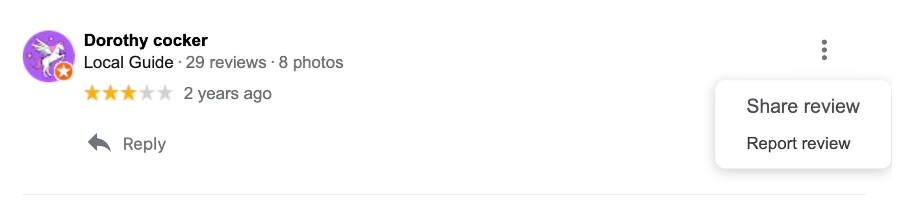
To ask Google to remove or delete an inappropriate review from your Business Profile, click the 3 dots in the top right and click on Report review. Google will remove reviews that violate its policies.
Remember, the more positive Google ratings and reviews you receive, the greater the chance of new customers finding you and purchasing your business’ products or services. Google reviews are a great way for you to build your brand and create a competitive advantage.
Remember, achieving your goals is possible with perseverance, commitment, and the right support! If you are seeking help on your journey to create an amazing business, contact our team at Numble for professional advice. We offer free consultations for small businesses; for the best insights, expertise, tips, and tricks, visit our blog page.